Run it yourself
Run Config Lab on your computer.
Three steps. Everything runs locally and all traffic is simulated, so nothing leaves your machine except the Docker image download.
- Docker, running (Docker Desktop is fine).
- Python 3.10 or newer. On macOS the built-in 3.9 is too old:
brew install python@3.11. - curl, a terminal, and free ports 8401, 8409 and 8411.
Get the code
$ git clone REPOSITORY-URL
$ cd t1-config-lab
Replace REPOSITORY-URL with the repository address. The project is not public yet, so the address is not on this page. Open the repository
Start it
$ SESSIONS=150 SESSIONS_AA=150 SESSIONS_SLOW=150 \
  SUFFIX=-q OWN_STACK=1 ./run.sh
This starts its own Flagsmith in Docker, runs the experiments with simulated sessions, then serves the dashboard. The first start pulls images, so it takes longer on a slow network. It is a check of the path, not evidence: with this few sessions most verdicts read inconclusive.
For the full-size runs (about 21 minutes), use OWN_STACK=1 ./run.sh. To only run the 38 unit tests, with no Docker, use ./run.sh test.
Open it
When the terminal prints === dashboard: http://localhost:8411, open that address in your browser.
http://localhost:8411
Flagsmith's own UI is at http://localhost:8401. The login email is printed during setup and the password is in .state.json in the project folder. Press Ctrl-C to stop the dashboard. To remove the Docker stack afterwards, run docker compose down in the same folder.
What you should see
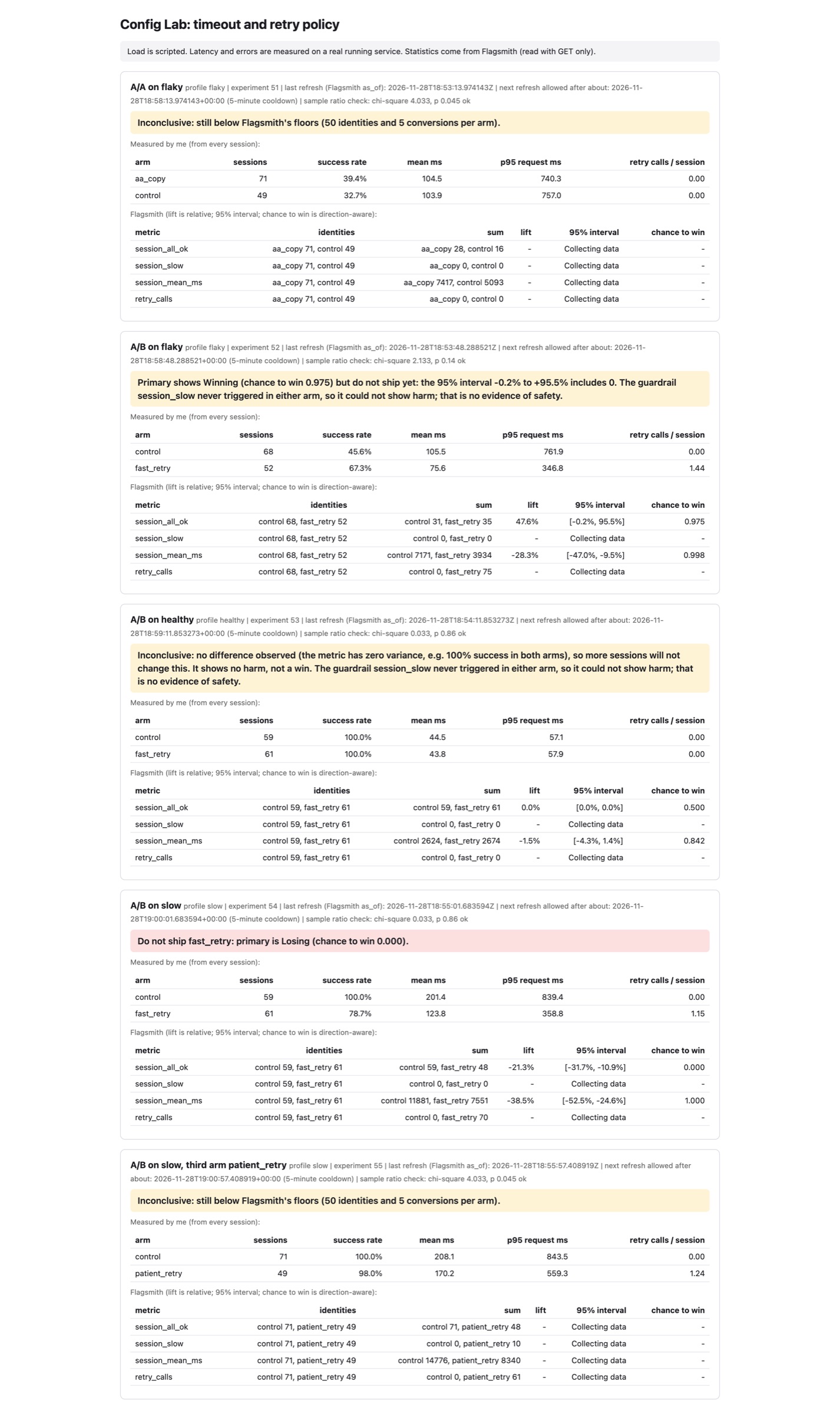
One card per experiment, each with a one-sentence verdict (ship, do not ship, or inconclusive) next to Flagsmith's numbers. This screenshot is from a small check run of 120 simulated sessions per experiment, so most cards read inconclusive. Your numbers will differ.
If it does not work
- "Python 3.10+ is required"Install a newer Python, then run it again with
PYTHON=/opt/homebrew/bin/python3.11 OWN_STACK=1 ./run.sh(add the quick-check settings from step 2 if you want the short run). - "Docker is not running"Start Docker Desktop, wait until it says it is running, then repeat step 2.
- "Port 8409 is busy"Another program uses that port. Pick a free one:
DEP_PORT=8419 ./run.shwith the same settings. The dashboard (DASH_PORT) moves by itself; Flagsmith usesFS_PORT.